Worktrak – Workforce Productivity Intelligence for Modern Businesses
Workforce Productivity Intelligence | A Software Product by Steelsonic Technologies
Introducing Worktrak
Businesses today operate across offices, remote locations and hybrid work environments. Managing productivity across these distributed teams requires more than attendance records and manually prepared reports. Organisations need better visibility into how working hours are utilised, how teams engage with their work and where operational improvements can be made.
Worktrak, developed by Steelsonic Technologies, is a workforce productivity and employee activity tracking platform designed to help businesses understand work patterns, monitor computer activity and make informed decisions about workforce performance.
By bringing together activity tracking, time utilisation insights, application monitoring and productivity analytics, Worktrak helps organisations gain a clearer picture of their day-to-day operations.
Understanding Workforce Productivity Beyond Attendance
Knowing when employees start and finish their workday is only one part of workforce management.
For organisations with distributed teams, managers also need to understand how working hours are utilised, which applications employees use, how much time is spent actively working and where interruptions or inefficiencies occur.
Worktrak addresses this need by providing a centralised view of employee computer activity and workforce productivity patterns.
It helps businesses move beyond conventional attendance management towards a more informed approach to understanding team activity and operational efficiency.
What Makes Worktrak a Practical Workforce Management Solution?
Worktrak brings together several aspects of employee activity monitoring and productivity analysis in one platform.

Employee Activity and Time Utilisation
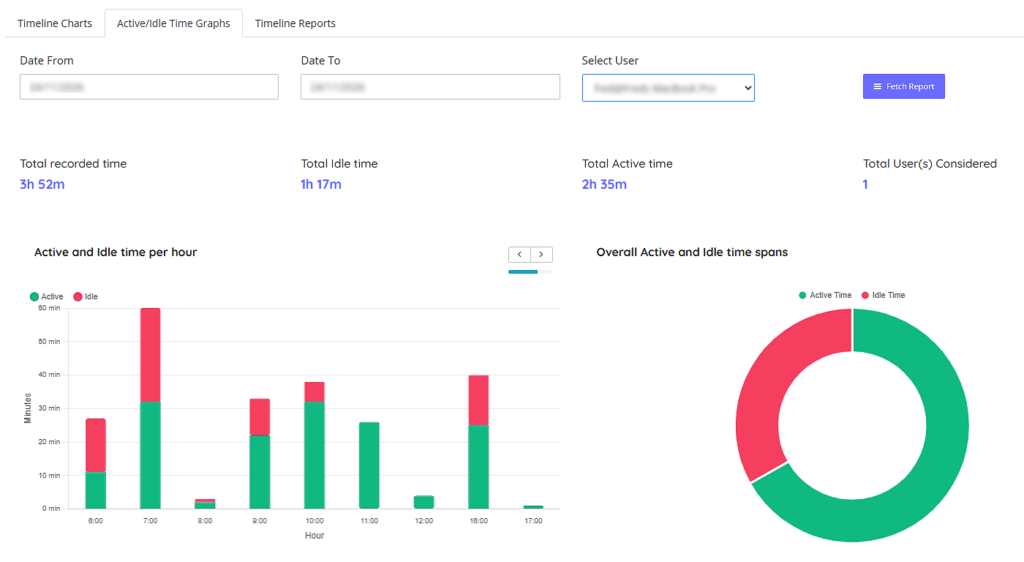
Understand how working time is distributed throughout the day through active and idle time insights. Managers can review employee activity patterns and identify variations in work schedules and utilisation.

Application and Website Usage Insights
Gain visibility into the applications and websites used during working hours. Organisations can classify applications and websites according to their relevance to different job roles and understand how digital resources are being utilised.

Visual Work Activity Records
Optional periodic screenshots provide additional context about computer activity. These records can help managers review work-related activity when additional visibility is required.

USB Storage Activity Monitoring
Monitor USB storage device activity and maintain records of file transfers. This provides organisations with an additional layer of visibility into removable storage usage across monitored systems.

Workforce Productivity Analytics
Convert collected activity information into meaningful reports. Review employee activity, productivity patterns and time utilisation to support better workforce planning and management decisions.

Cloud and On-Premise Deployment Options
Different organisations have different infrastructure and data management requirements. Worktrak supports cloud-based deployment as well as on-premise installations for businesses that prefer to operate the platform within their own infrastructure.
Use Case Scenarios of Advanced RunAs
Managing Administrator Privileges and Controlling Applications on Endpoints: Use Cases
Case 1: Installer Elevation
Allowing standard users to install applications that typically require administrator rights
Imagine a user in your department who usually needs administrator rights to install, or update a list of applications and processes. When you remove local admin rights and make the user a standard user, these installation setups won’t run.
With Advanced RunAs, standard users can install those applications effortlessly, without any hassle.
Create a RunAs exe with the installer path located in a server path. Distribute the RunAs exe to the user. With this Runas exe, the user can install the software on his own.
Case 2: Application Elevation
Allowing standard users to run application which require admin credentials
Assume a standard user in your company wants to have the option to start and stop few services for performing his routine tasks. Starting and stopping services needs permissions.
The management says you cannot give the end user full permission
Advanced Runas can help in this situation. You can create a RunAs executable which can start the “services.msc” with elevated credentials of local administrator.
The standard user can use this RunAs to start the services.msc and start or stop any service as required. You can set a time limit to this RunAs till the duration of the specific project if required.
Learn How to Implement Advanced RunAs
Start with this comprehensive guide to understand the problem Advanced RunAs solves, then explore additional resources to plan your implementation:
Steelsonic products are trusted by
Steelsonic Technical Services
Online since 2005 and registered as a software company in the year 2015. Located in Bangalore, the silicon valley of India.