
Windows Privilege Management

Let standard users run specific apps as administrator
without giving them admin rights.

Advanced RunAs grants on-demand, time-limited elevation to individual applications.
No shared admin passwords. No permanent privilege changes. No UAC prompts your users can't get past.

Trusted by 18,000+ customers · Serving IT teams since 2015 · Windows 10, 11 & Server

5

Products

18000+

Customers

1400+

Web Listings

16

Years of Experience

How Advanced RunAs works

number-1

Create a RunAs executable

Package the target application with elevated credentials using the Advanced RunAs builder. Encrypt credentials with RC4, set an expiry date, and lock the executable to a specific MD5 checksum.

steelsonic run as - step 2

Distribute to the standard user

Send the RunAs executable to the user. They don't need local admin rights, additional client software, or any installation step — it just runs.

number-3

The app elevates. The user doesn't.

The user launches the packaged executable and the target app runs with elevated credentials — on demand and time-limited. When the executable expires, the elevation stops.

No shared admin passwords

Each elevation is packaged into its own encrypted executable , no admin password is ever handed to the end user.

Least privilege, enforced

Strip local admin rights from every endpoint while standard users still get the applications they need.

Auditable and time-limited

Every RunAs executable has a configurable expiry. Elevation stops automatically.

Guides & How-tos

IT administrator managing elevated application permissions and privilege access control

The Admin Rights Dilemma

How to let standard users run applications as administrator without giving admin rights...

Network monitoring dashboard showing ping connectivity and server uptime metrics

What is UAC and Does It Matter?

Windows UAC Bypass for Specific Applications: Security Guide...

Our Products for your IT Team

Designed and developed to assist the network and systems administrators in automating the day to day tasks

Steelsonic Advanced RunAs

Advanced RunAs

Remove local administrator privileges on Windows servers and endpoints. Effortlessly elevate applications for standard users with on-demand, time-limited permissions.

Network Inventory

Automatically discover, track, and manage all hardware and software assets across your entire network. Maintain accurate inventory records and audit endpoints with ease.

Steelsonic Ping Monitor

Ping Monitor

Advanced network surveillance tool for real-time host availability, ICMP pings, latency tracking, and port activity monitoring across your infrastructure.

Event Log Analyzer

Enterprise event long analytics. Monitor, track and analyze the events occuring in all computers in the network for critical failures, warnings and notices.
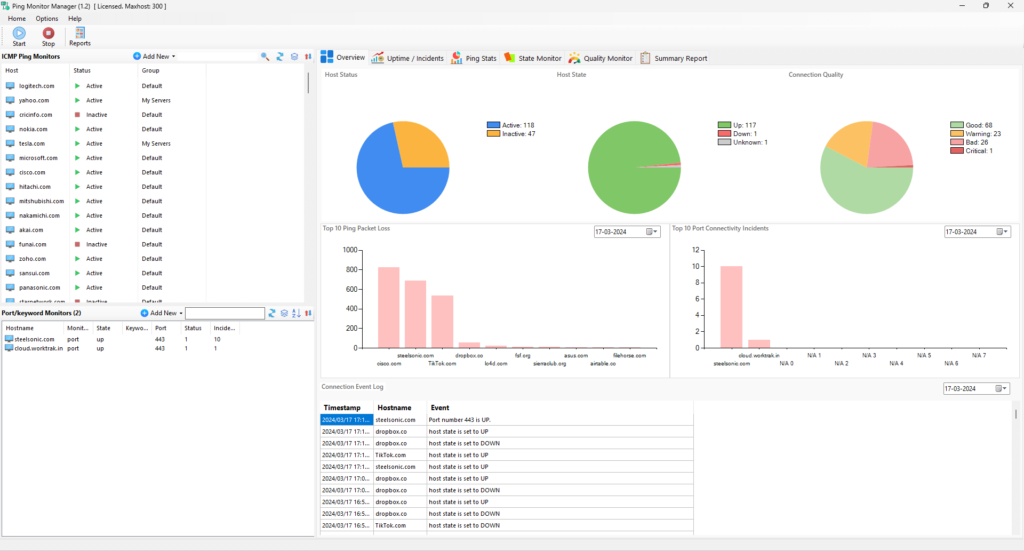

Introducing Ping Monitor v1.4

Ping Monitor is an advanced network surveillance tool that elevates the standards of host and service availability monitoring. Designed to execute automatic pings, our system not only detects the up/down status of network hosts but also provides comprehensive monitoring of port activities crucial for service uptime such as SMTP,HTTP,IMAP etc.

With our intuitive ICMP pings, administrators gain insights into connection quality through real-time analytics of packet loss, latency, and jitter. Beyond conventional metrics, Ping Monitor uniquely offers keyword monitoring, enabling you to oversee the presence of specific content across numerous websites effortlessly. Our software is powered by the high-performance MongoDB database, guarantees swift processing and storage of extensive monitoring data.

Steelsonic Ping Monitor Dashboard

Steelsonic products are trusted by

Steelsonic Technical Services

Online since 2005 and registered as a software company in the year 2015. Located in Bangalore, the silicon valley of India.

2026 © Steelsonic Software

Scroll to Top